Customizable Battlemaps: Dungeon Rooms Vol. II

Where To Play
Find gamers to play Customizable Battlemaps: Dungeon Rooms Vol. II and make friends!


Matches
RPG Games Events
Game Details


Go World Ranking
Game Info
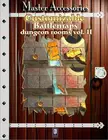
From the publisher: Did you ever dream to make yourself the gorgeous battlemaps produced by Øone? Do you want an alchemist laboratory with the objects you decide inside? Do you want to put a trap under the staircase or want the treasure room plundered? Do you want to show the same room but with things changed to the player who visit it for the second time? With this new, exciting product you can do all of these and more! Still, you will have a beautiful, superb rendered map, to throw under the feet of your player's miniatures. With Customizable Battlemaps you can quickly modify the popular battlemaps produced by Øone. With few clicks you can modify the objects, the doors and even the lighting of the room. Want the door opened? Click, just done. Want the door shattered? Click, done. With each map you can produce and print an average 3000 different maps! Features: Intuitive Interface: No troubles: few clicks to modify an print your favourite map. PDF format: run just on every computer in the world. Control Sheet: Each map comes with a control sheet you should visualize with the map page in order to see the changes you apply in real time (see picture above) Lighting Controls: You can change the lighting type of the room. You can use standard lighting, low lighting and spotlight. Default Presets: these are the built-in presets. Each map has four built-in presets. these are the most common room configurations: plundered room, empty room and the like. Custom Presets: this feature allows you to store your maps. Once you’ve assembled your map click on “save preset” to save it, and on “load preset” to recall it. Room Title and Description: You can store custom room titles and descriptions with the maps. The title you type here will be stored in the preset you save and will be printed on one side of the map. The field description allow you to store notes about your map. B&W Version: you can generate a black and white, ink-saving version of the map, just one click to do it. Map Control: The B&W miniature map shows (red-highlighted zones) the areas you can click and change. Your click cycles the various configurations of each zone. For example: if you click on the door once, the door will open; if you click on the door one more time, the door will appear broken on the floor; if you click again the door will return closed. Each zone could have two or more options, click to discover them.
Random Games
Times of the World
Time Squares
Wings of War: Deluxe Set
COBRA: The Normandy Campaign
Red Dragon Rising: The Coming War With China
Tower of Terror
The Russo-Swedish War
The Egyptian Campaign
First Blood: Second Marne, 15 July 1918